BLauncher — free Minecraft launcher: mods, Rust, play with friends, own server

BLauncher

A free Minecraft launcher: mods and modpacks from Modrinth, play on Java or Rust, rooms for playing with friends and your own server — all in one app.

▼ Download v1.14.114

Windows · Linux · Android — Java is built in, nothing else to install. Other system

What is BLauncher

BLauncher is a free Minecraft Java Edition launcher for Windows, Linux and Android. Play any release version with or without mods, on regular Java or on a new engine written in Rust, install mods and modpacks from Modrinth in one click, play with friends over the internet without touching your router, run your own server on your PC or a VPS, and paint skins. Java is built in, there are no ads, and you can play with just a nickname or sign in with Microsoft.

  • Freeno ads, no paid features
  • Windows · Linux · AndroidLinux and Android are in beta
  • Java built innothing to install
  • Java or Rustchoose the game engine

Play without extra steps

  • Any release version of Minecraft Java Edition, from the oldest to 26.x. Game files are downloaded straight from Mojang's servers.
  • The launcher picks and installs the right Java by itself: Java 8 for old versions, newer ones for recent releases.
  • Play with any nickname without a license, or sign in with Microsoft for servers that only accept licensed players.
  • Several profiles with their own nickname, skin and cape.
  • The «Recommended» button picks how much memory to give the game; you can also set memory per build.
  • The launcher updates itself quietly when you close it.
Minecraft on Rust (Rustcraft)

On the «No mods or builds» card you can choose the game language: Java or Rust. Rust means Minecraft 26.3 on Rustcraft, an engine rewritten from Java in the Rust programming language. The engine is experimental: it starts faster, but mods don't work in it. You need a graphics card with Vulkan or DirectX 12. If Rustcraft fails to start, the launcher switches back to Java on its own.

More about Minecraft on Rust →

Mods, builds and modpacks

  • Forge, Fabric and NeoForge loaders — pick one in a build and the launcher installs it.
  • Search and install mods, shaders, resource packs and data packs from Modrinth right in the launcher.
  • Modrinth modpacks in one click: the launcher creates a build with the right version and loader.
  • Save a build as a .mrpack file, open someone else's .mrpack, or share a build by link.
  • Fabric API is added automatically for Fabric mods.
  • Exclusive: a beta port of the Create mod to Minecraft 26.3 for NeoForge and Fabric.

Build repair

If a modded game crashes, the launcher reads the log and the mod files and offers «Repair and play»: download a missing dependency, remove a duplicate, disable a mod that doesn't fit the version, set aside a broken config file. You can also run «Check and repair mods» from the build window in advance. Mods are disabled, not deleted, so they are easy to bring back.

Friends and playing together

  • The «Friends» tab: add a friend by code, see who is online and their profile with skin.
  • «Play together» rooms — your own virtual network (like a VPN) based on ZeroTier. Create a room, invite friends or send them a link, open your world — and friends join as if on a local network. No router or port setup.
  • Rooms can be open or private with join approval.
  • Rooms currently work on Windows only.

Your own server: on a PC, on a VPS, or buy one

  • On your computer. Start a server with your own build in the «Server» tab. Friends connect through the built-in playit.gg tunnel, no port forwarding. server.properties settings are simple tiles.
  • On a VPS. Enter the address, login and password of a rented server — the launcher installs Java and Minecraft, sets up autostart and the firewall. Then manage it from the launcher: start, console, mods, moving a server from your PC, several servers on one VPS, scheduled restarts. VPS guide (in Russian) →
  • Buy a server. A tab with serv.host VPS plans in 27 countries, with prices and specs at a glance.

Skins, capes and item studio

  • 3D skin and cape editor: paint right on the model and apply it to your profile.
  • Item studio: build a scene from blocks and items and get a ready command for a command block.
  • Themes (dark, black, light) and your own backgrounds.
  • Interface in Russian and English. The English translation is partial for now: the main screens are translated, some pop-up messages are still in Russian.

Supported systems

Windows 10 and 11the main version with everything described above. Installer ~55 MB.
Linux (beta)64-bit Linux, the same launcher. «Play together» rooms and the playit.gg tunnel are Windows-only for now.
Android (beta)Minecraft Java Edition on your phone — versions 1.0 to 26.2, mods, loaders, your own server. Needs Android 8 or newer on arm64. No Rust on Android.

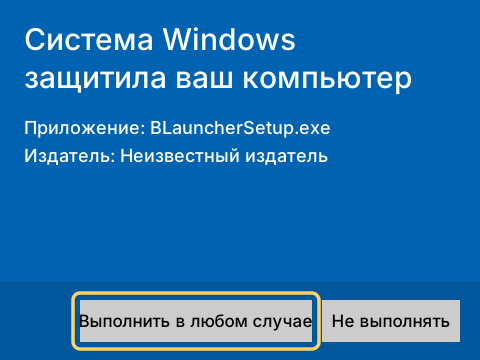
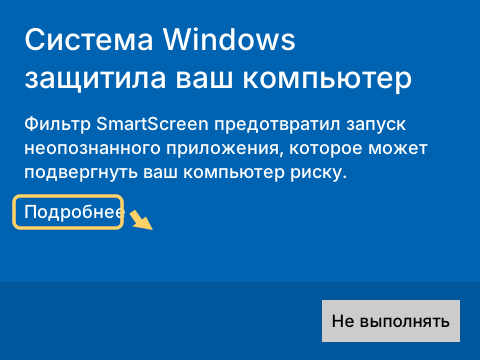
The launcher's source code is open on GitHub. The installer has no paid code signature, so Windows may warn you when you run it — see the FAQ.

See the interface → A working copy of the launcher in your browser: tabs, mod search, skin editor (switch to English in its Settings)

Download

BLauncher for Windows

Java is built in, the game downloads on first launch. Run the installer — it suggests a folder, creates a desktop shortcut and starts the launcher, which fetches the rest.

▼ Download for Windows

Windows 10/11 · v1.14.114 · installer ~55 MB + ~39 MB download · the game downloads on launch

BETA

BLauncher for Linux

The same launcher for 64-bit Linux, Java built in. Unpack the archive and run ./blauncher; ./install.sh adds it to the app menu. Rooms for playing with friends are Windows-only for now.

▼ Download for Linux

Linux x86_64 · v1.14.114 · archive ~81 MB, updates itself on first launch · beta

BETA

BLauncher for Android

Minecraft Java Edition on your phone — 1.0 to 26.2, with mods, loaders and your own server. Java built in, the game downloads on first launch. Needs Android 8+ on arm64.

▼ Download for Android

Android 1.8.1 · ~147 MB · beta: not everything works yet

FAQ

Why does Windows warn me during installation?

The installer has no paid code signature, so Windows may show «Windows protected your PC». This happens with every unsigned program and does not mean the file has a virus. Click «More info», then «Run anyway». Your browser may also say the file is rarely downloaded — open the downloads list and choose «Keep».

Do I need a Minecraft license?

No. You can play with just a nickname. If you own Minecraft, sign in with Microsoft in the launcher — you need it for servers that only accept licensed players.

Is the launcher in English?

Partly. The interface has Russian and English; main screens and labels are translated, but some pop-up messages are still in Russian. We are translating the rest.

How do I play with a friend? Do I need Hamachi or a VPN?

No Hamachi needed. In the «Friends» tab add your friend by code and create a «Play together» room — a virtual network based on ZeroTier. Open your world and your friend joins as if on a local network, no router setup. Rooms work on Windows only for now. You can also start your own server in the «Server» tab.

Which Minecraft versions are supported?

On Windows — any release version of Minecraft Java Edition, downloaded straight from Mojang. Mods through Forge, Fabric and NeoForge. On Android (beta) — versions 1.0 to 26.2, Android 8 or newer on arm64.

What if the game crashes with mods?

After a crash the launcher reads the log and the mods and offers «Repair and play»: it downloads a missing dependency, removes a duplicate or disables a mod that doesn't fit the version. You can also check a build in advance with «Check and repair mods» in the build window.

Can I play Minecraft on Rust?

Yes, on Windows. On the «No mods or builds» card choose «Rust» as the game language — Minecraft 26.3 starts on the Rustcraft engine, rewritten in Rust. It is experimental: no mods, and you need a graphics card with Vulkan or DirectX 12. More about Minecraft on Rust.

How much does it cost?

Nothing. BLauncher is free, with no ads or paid features. You only pay if you decide to rent a VPS for your own server — that payment goes to the hosting company.

Will it run on a weak PC?

The launcher needs Windows 10 or 11 or 64-bit Linux; Java is built in. In Settings the «Recommended» button picks how much memory to give the game. On a weak computer choose lighter versions and optimization mods such as Sodium — they are in the «Mods» tab.